The best keyboards for work balance a comfortable layout with the connections and controls your daily setup needs. These picks range from quiet, full-size wireless models to compact mechanical boards, so choose by desk space, number-pad use and how much customization you want.
Quick Top Products
JLab JBuds Wireless Keyboard

- 95-key layout includes a full numerical pad.
- Switch among up to three device connections.
- Rechargeable wireless battery rated for up to 30 days.
Best For: People who want quiet typing, a number pad and quick switching among work devices.

JLab Epic Wireless Keyboard

- Full-size layout has 108 backlit keys.
- Connects to three devices over Bluetooth, plus a USB dongle option.
- Rechargeable 2000 mAh battery.
Best For: Workers who prefer a full-size layout, low-light visibility and multi-device wireless use.
SteelSeries Apex 3 TKL

- Tenkeyless layout saves space while retaining essential keys.
- Whisper-quiet switches and dedicated media controls.
- IP32 water and dust resistance.
Best For: Workers who want a quieter compact keyboard with dedicated media controls.
SteelSeries Apex 3

- Whisper-quiet switches are rated for 20 million keypresses.
- Includes a magnetic wrist rest for palm support.
- IP32 water resistance and dedicated multimedia controls.
Best For: Desk workers who want a full-size quiet keyboard with a supported palm position.
SOLAKAKA KI99 Pro Silent

- 96% layout and control knob.
- Silent switches and five noise-reducing layers.
- Tri-mode Bluetooth, 2.4G and Type-C connectivity.
Best For: Mechanical-keyboard users who want quieter switches, a number pad and wireless connections.
SOLAKAKA A75 75% Wireless Mechanical Keyboard
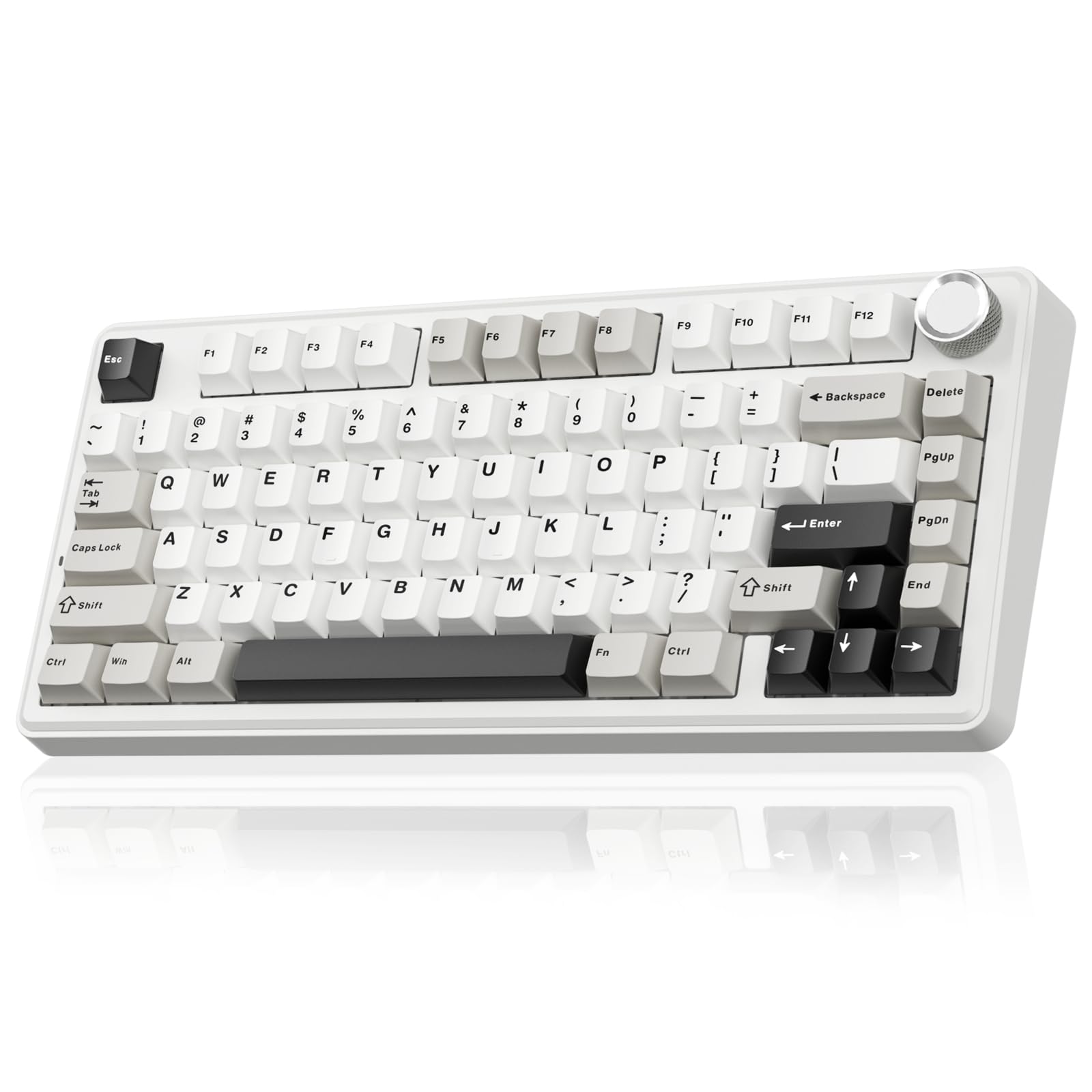
- 81-key 75% layout retains arrow keys.
- Supports Bluetooth, 2.4GHz wireless and USB-C.
- PBT keycaps and a 4000mAh battery.
Best For: Workers who value a compact arrow-key layout, wireless connections and replaceable switches.
JLab JBuds Wireless Keyboard 16-Pack
- Pack contains 16 keyboards.
- The model has 95 keys and a media knob.
- Wireless use is rated up to 30 days per charge.
Best For: Teams outfitting desks that need a low-profile wireless keyboard with a media knob.
JLab Go Wireless Keyboard 4-Pack
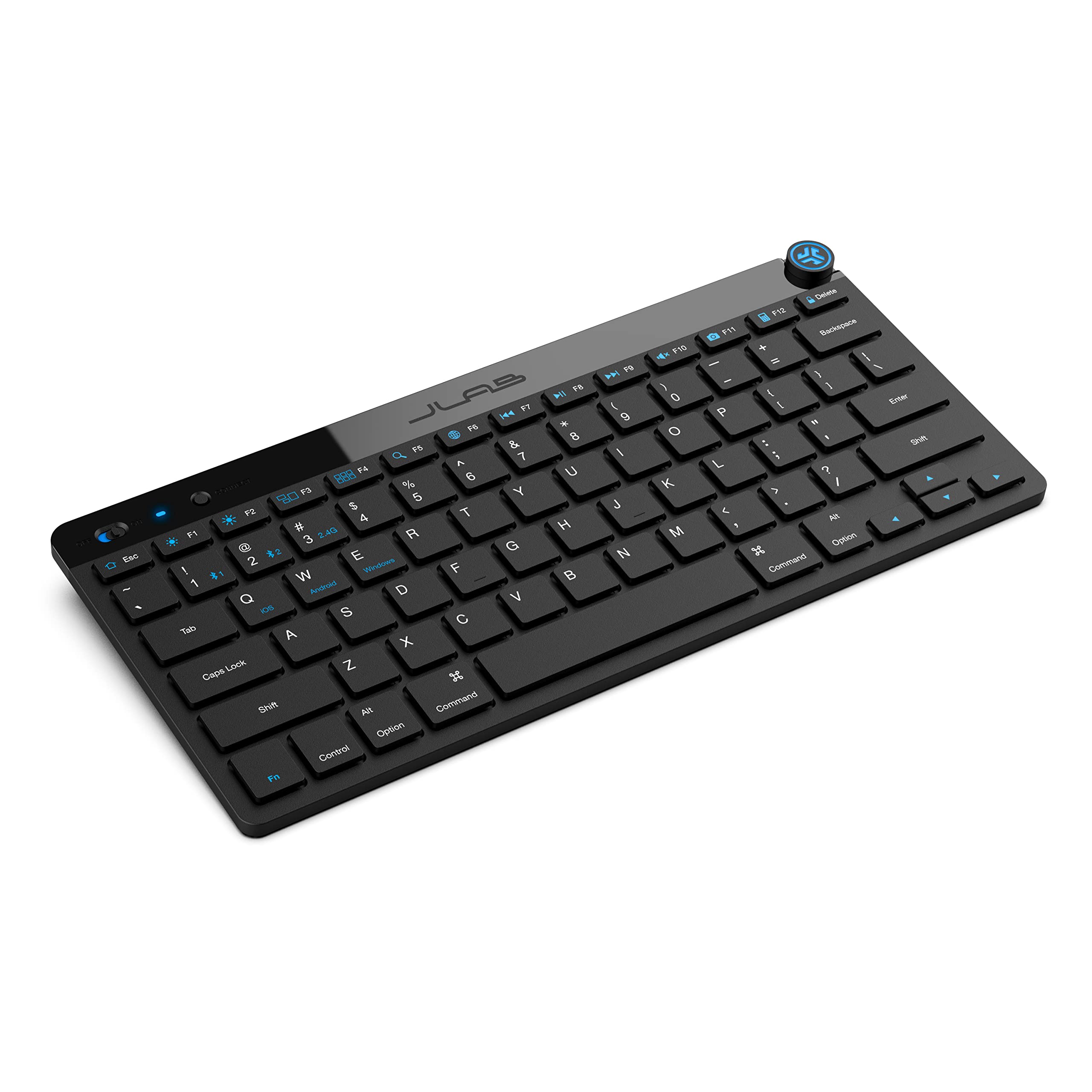
- Compact, low-profile layout is intended for portable setups.
- Supports Bluetooth 5.0 or a USB wireless dongle.
- This offer is a four-pack.
Best For: Teams or households equipping several minimalist desk and travel setups.
Quiet Wireless Typing with a Number Pad
JLab JBuds Wireless Keyboard, 95 Key, Multi-Device Bluetooth and USB dongle, Soft Touch Keys, Media knob, Custom Profiles, Black
The JLab JBuds pairs a compact 95-key layout with a full numerical pad, giving spreadsheet users number entry without taking up the footprint of a standard full-size board. Its soft-touch keys are designed for quiet typing, and the smart media knob puts volume and playback control within reach.
It connects over Bluetooth 5.2 or a USB wireless dongle and can toggle among up to three connections, which suits a desk shared by a computer and mobile devices. The rechargeable battery is rated for up to 30 days of wireless use.
Check that you are buying the single-keyboard offer and that its layout suits your work.
Best For: People who want quiet typing, a number pad and quick switching among work devices.
| Pros | Cons |
|---|---|
|
|
Choose the JBuds if work involves frequent numeric entry but you also want a tidy desk and simple device switching. The soft-touch keys and media knob suit everyday writing and calls, while the wireless options support a multi-device setup.
Its 95-key layout is more compact than a full-size arrangement, but the record does not give physical dimensions, battery capacity or charging time. Confirm that the number-pad placement and key layout fit your habits before buying.
Full-Size Backlit Keys for Dim Desks
JLab, Epic, Wireless Keyboard, Bluetooth 5.2, USB Dongle, Multi-Device, Backlit, 108 Keys, Black
The JLab Epic provides a conventional 108-key full-size layout with illumination across all keys, making it a practical fit for desks where work continues in dimmer conditions. Its soft-touch keys are described as comfortable and quiet, and a smart media knob handles audio volume without reaching for on-screen controls.
Bluetooth 5.2 pairs with up to three devices, with a USB wireless dongle as another connection option. A 2000 mAh rechargeable battery powers the keyboard, and custom profiles through the JLab Work App can tailor the setup to different workflows.
Consider the full-size footprint and whether you want backlighting before choosing it.
Best For: Workers who prefer a full-size layout, low-light visibility and multi-device wireless use.
| Pros | Cons |
|---|---|
|
|
The Epic makes sense for users who rely on a standard full-size keyboard and want lit keys plus quick audio adjustment. Its Bluetooth and dongle options make it flexible across devices, while the app profiles may help keep separate work setups.
The tradeoff is desk footprint: a full-size layout preserves familiar key access but occupies more room than a compact model. Battery capacity is provided, but runtime is not, so consider how often you want to recharge.
Compact Tenkeyless Board with Spill Resistance
SteelSeries Apex 3 TKL RGB Gaming Keyboard – Tenkeyless Compact Form Factor - 8-Zone RGB Illumination – IP32 Water & Dust Resistant – Whisper Quiet Gaming Switch – Gaming Grade Anti-Ghosting,Black
The Apex 3 TKL removes the number pad to leave more open desk space, while retaining a tenkeyless layout with arrow and function keys. Its whisper-quiet switches and dedicated multimedia controls fit shared rooms or work that mixes typing with calls and media playback.
The board has IP32 water and dust resistance and anti-ghosting, plus RGB illumination for users who want visible customization. Compatibility includes Windows and Mac OS X as well as several game consoles.
This is a wired gaming-oriented keyboard, so it suits a fixed desk better than a setup that needs wireless device switching. Check whether you can work comfortably without a dedicated number pad.
Best For: Workers who want a quieter compact keyboard with dedicated media controls.
| Pros | Cons |
|---|---|
|
|
Pick the Apex 3 TKL when desk space and quiet typing matter more than numeric entry. Its media controls put common audio adjustments at hand, and IP32 resistance adds a defined level of protection against water and dust.
The product is framed as a gaming keyboard, but its quieter switches and compact layout can suit general office tasks. It does not document wireless operation, so check your preference for a wired connection and confirm that a separate number pad is unnecessary.
Quiet Typing with a Magnetic Wrist Rest
SteelSeries Apex 3 RGB Gaming Keyboard – 10-Zone RGB Illumination – IP32 Water Resistant – Premium Magnetic Wrist Rest (Whisper Quiet Gaming Switch)
The SteelSeries Apex 3 combines whisper-quiet switches with a magnetic wrist rest that provides full palm support. Dedicated multimedia controls let you adjust volume and settings without leaving the keyboard, while its 10-zone RGB illumination adds optional color effects.
IP32 water resistance is intended to help prevent damage from accidental liquid spills. The title identifies this as a gaming keyboard rather than a wireless office model, so it is best suited to a stationary desk where a conventional full-size footprint works.
Check the dimensions and whether its switch feel and wrist rest match your typing position before buying.
Best For: Desk workers who want a full-size quiet keyboard with a supported palm position.
| Pros | Cons |
|---|---|
|
|
This Apex 3 fits workers who want a quiet typing feel and a wrist rest included in the package. Its media controls and spill resistance add practical desk features, while the RGB zones are optional visual customization.
The record does not identify a compact layout or wireless device switching, so treat it as a stationary desk choice and verify that its footprint suits your setup. Consider whether the attached magnetic rest positions your hands comfortably.
Silent-Switch Mechanical Typing in a 96% Layout
SOLAKAKA KI99 Pro Wireless Mechanical Keyboard with Quiet Switch, Hot Swappable Pre-Lubed Switches with RGB Backlit, Gasket Structure Computer Gaming Keyboard (BlackBlue, Silent Switch)
The SOLAKAKA KI99 Pro Silent pairs a 96% layout with silent switches, offering a space-conscious way to keep number-pad access. Its five noise-reducing layers and gasket structure are designed to reduce typing noise, while the knob handles volume, media and lighting brightness.
It supports Bluetooth 5.0, 2.4G wireless and Type-C connections, and the 10,000mAh battery is intended to reduce charging frequency. Hot-swappable 3/5-pin support lets owners change switches without soldering.
This is still a mechanical keyboard with extensive customization, so check its layout, connection mode and switch feel against your office environment.
Best For: Mechanical-keyboard users who want quieter switches, a number pad and wireless connections.
| Pros | Cons |
|---|---|
|
|
Choose this model if you want mechanical customization but need to limit typing noise and keep a compact number-pad layout. The silent switches, dampening layers and knob suit a work-focused desk, while tri-mode connections offer flexibility between wired and wireless use.
The records do not provide a runtime estimate or clarify software support across operating systems. Confirm the switch feel and whether its customization features work with your work computer before purchase.
Compact Wireless Work Layout with PBT Keycaps
SOLAKAKA A75 75% Wireless Mechanical Keyboard, Hot Swappable Gaming Keyboard with Multifunction Knob & RGB, Gasket Mounted Creamy Keyboard, PBT Keycaps, Compact Layout for Win/Mac/PC
The SOLAKAKA A75 keeps an 81-key 75% layout with arrow keys, trimming desk footprint while preserving useful navigation controls. Its 2.4GHz, Bluetooth 5.0 and USB-C modes support a mix of wired and wireless setups, and the keyboard can connect to up to five devices.
A multifunction knob switches between gaming and office modes; in office mode it can mute audio and adjust volume. The PBT keycaps and 4000mAh battery are useful details for regular use, while hot-swap support allows switch changes without soldering.
It omits a number pad, and its software is limited to Windows and wired mode, so check those constraints.
Best For: Workers who value a compact arrow-key layout, wireless connections and replaceable switches.
| Pros | Cons |
|---|---|
|
|
The A75 is a useful fit when a compact layout and switching among several devices matter more than dedicated numeric entry. Its arrow keys, office-mode knob and three connection types cover common desk tasks, while PBT keycaps and hot-swap support add customization.
The concrete tradeoff is software access: configuration requires Windows and a wired connection. If your work relies on macros or software settings from a Mac, confirm that the built-in controls are enough.
Slim Wireless Layout with App Profiles
JLab JBuds Wireless Keyboard | Bluetooth and USB dongle, Multi-Device, Media knob, Custom Profiles, Black (16 Pack)
This JBuds offer shares the model's 95 soft-touch keys, full numerical pad, media knob and Bluetooth or USB dongle connections, but this candidate is explicitly packaged as a 16-pack. That makes it more relevant to an office purchasing keyboards for multiple stations than to someone choosing one personal desk keyboard.
Each unit is described as supporting up to three device connections and up to 30 days of wireless battery life, with custom profiles available through the JLab Work App. The offer has an unusually high bundle count for a normal individual purchase, so verify the package quantity and your intended deployment before ordering.
Best For: Teams outfitting desks that need a low-profile wireless keyboard with a media knob.
| Pros | Cons |
|---|---|
|
|
This candidate fits an office or organization equipping multiple desks with matching keyboards, rather than a personal single-keyboard purchase. The JBuds feature set is useful for shared devices and everyday admin work, with a number pad and media knob.
The main tradeoff is the 16-pack quantity, which affects storage and purchasing needs. Confirm that the bundle count is appropriate and that each workstation can use Bluetooth or a USB dongle.
Portable Low-Profile Keyboard in a Four-Pack
JLab Go Wireless Keyboard, Bluetooth and USB dongle, Multi-Device, Compact, Black (4 Pack)
The JLab Go is a compact, low-profile wireless keyboard designed for travel, home offices and minimalist desks. It pairs over Bluetooth 5.0 or a USB wireless dongle and saves up to three device connections, while its quiet scissor-switch keys and lightweight build support portable use.
The keyboard works across Windows, macOS, iOS, Android and Chrome OS. This offer is a four-pack, positioning it for a small team, classroom or household with multiple stations rather than one individual workstation.
It is not water resistant, and the compact layout may omit keys some desk workers depend on, so check the layout and quantity before ordering.
Best For: Teams or households equipping several minimalist desk and travel setups.
| Pros | Cons |
|---|---|
|
|
The Go is aimed at portable or minimalist use, with quiet scissor switches and broad operating-system compatibility. The four-pack can make sense for a small team or household, but it is a poor fit if you only need one keyboard.
Its compact design may trade away some familiar keys, and the record does not clarify exact key arrangement beyond the 78-key specification. Check the layout and bundle size against your intended desks.
How to Choose Keyboards For Work
How We Picked Keyboards for Work
The candidates span office-oriented wireless boards and gaming-branded mechanical keyboards, so selection focused on features with a clear desk use: quiet or soft-touch keys, useful work layouts, connection flexibility and controls for audio or media. Compact models needed to retain practical navigation keys, while number-pad options offered a better fit for frequent numeric entry.
Bundled keyboards were included only for their team or multi-station use case.
This shortlist includes both quiet scissor or whisper-quiet options and customizable mechanical designs. The latter can provide switch choice, programmable controls or multi-device wireless connections, but their gaming orientation and lighting may be more than a typical office requires.
Check the exact layout and bundle quantity for the candidate you choose.
Comparing Keyboards for Work
The layout is the first meaningful split. JLab's JBuds provides a 95-key arrangement with a full numerical pad, while the JLab Epic keeps a full-size 108-key format and backlighting.
The Apex 3 TKL and compact SOLAKAKA A75 models save desk space but omit a number pad. The KI99 Pro Silent offers a 96% layout for users who want a compact mechanical board with number-pad access.
Typing sound and connection style also differ. The JLab soft-touch boards and SteelSeries Apex 3 options emphasize quieter typing.
The SOLAKAKA KI99 Pro Silent combines silent switches with noise-reducing layers, while A75 models focus on hot-swap customization and tri-mode connections. The wireless JLab choices pair across multiple devices, and several SOLAKAKA models also support wired USB-C.
Check the exact included item and work-computer software compatibility where customization matters.
| Product | Standout features | Best for |
|---|---|---|
| JLab JBuds Wireless KeyboardCheck Price |
| People who want quiet typing, a number pad and quick switching among work devices. |
| JLab Epic Wireless KeyboardCheck Price |
| Workers who prefer a full-size layout, low-light visibility and multi-device wireless use. |
| SteelSeries Apex 3 TKLCheck Price |
| Workers who want a quieter compact keyboard with dedicated media controls. |
| SteelSeries Apex 3Check Price |
| Desk workers who want a full-size quiet keyboard with a supported palm position. |
| SOLAKAKA KI99 Pro SilentCheck Price |
| Mechanical-keyboard users who want quieter switches, a number pad and wireless connections. |
| SOLAKAKA A75 75% Wireless Mechanical KeyboardCheck Price |
| Workers who value a compact arrow-key layout, wireless connections and replaceable switches. |
| JLab JBuds Wireless Keyboard 16-PackCheck Price |
| Teams outfitting desks that need a low-profile wireless keyboard with a media knob. |
| JLab Go Wireless Keyboard 4-PackCheck Price |
| Teams or households equipping several minimalist desk and travel setups. |
Choosing a Keyboard Layout for Office Tasks
A full-size keyboard is useful for people who rely on function keys and a dedicated number pad. The Epic suits that preference and adds backlighting; the JBuds preserves a number pad in a more compact 95-key format.
These are practical choices for bookkeeping, spreadsheets or data entry where number placement is part of muscle memory.
Tenkeyless and 75% layouts create more mouse room. The Apex 3 TKL is the quieter option with multimedia controls, while the SOLAKAKA A75 boards retain arrow keys in an 81-key arrangement.
If you move between documents, cells and browser windows, confirm the navigation and function-key access you need before choosing a smaller keyboard.
Quiet and Wireless Keyboards for Shared Workspaces
For shared rooms, look for clear evidence of reduced typing noise. The JLab JBuds uses soft-touch keys, the Epic describes a quiet typing feel, and the Apex 3 models use whisper-quiet switches.
The KI99 Pro Silent adds silent switches and five noise-reducing layers. A clicky mechanical board may be satisfying for its owner but can be distracting nearby, so switch style should fit the actual room.
Wireless models can simplify a clean desk or support switching between a work computer and tablet. JLab keyboards use Bluetooth and a USB dongle, while SOLAKAKA models offer Bluetooth, 2.4GHz and USB-C.
Review battery runtime where provided, and check whether required software is supported by your operating system. Some A75 software customization requires Windows and wired mode.
Who Should Buy Which Work Keyboard?
Choose the JLab JBuds for quieter everyday typing, media access and a number pad, or the Epic if full-size backlit keys matter more. The Apex 3 TKL suits a fixed desk where quiet switches, multimedia controls and a smaller footprint are priorities; the full-size Apex 3 adds a magnetic wrist rest.
For a customizable mechanical board with quieter switches, consider the KI99 Pro Silent. The SOLAKAKA A75 options suit compact desks and multi-device setups, with the crystal-keycap variant adding a distinctive illuminated style.
The JLab Go four-pack and JBuds 16-pack are aimed at outfitting multiple stations. Before ordering, match the bundle size, key layout, software support and connection method to the actual work setup.